Automated bank reconciliation
for books you can trust
Your bank transactions flow in. AI sorts every one. Receipts find their match. A real accountant checks the rest. Books that hold up in an audit, without the weekend spreadsheet.

AI does the sorting. Accountants sign it off.
Every transaction takes the same route: in from your bank, categorised, matched to proof, then verified by a human.


A fast AI model categorises each transaction. Not sure? A stronger model takes over. Still not sure? It goes straight to an accountant.
Bookkeeping, minus the busywork
The jobs that used to eat your month-end, done in a few clicks.

No receipt? No problem
Click I don't have a document. AI suggests the right category from the bank description. Submit, and it's reconciled.

Categorise in bulk
Select a batch of similar transactions, accept the suggested category, and apply it to all of them in one click.

Close the year in 3 steps
Your financial year tile walks you through it: confirm bank accounts, explain open transactions, match leftover invoices.
Do your bookkeeping
from your AI chat
Connect Claude, ChatGPT or Gemini to Osome to search transactions, upload receipts and apply Osome's recommended categories. Nothing is recategorised until you confirm.

Your books,
in your pocket
Snap a receipt the moment you pay and let it find its match. Answer your accountant's questions and clear what needs your attention, all from the Osome app.

Part of a greater whole
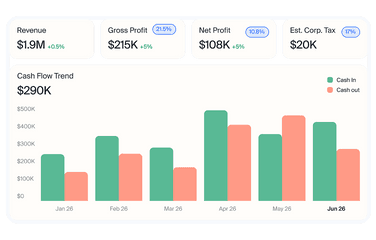
Insights & reports
Reconciled numbers become live revenue, profit and runway charts.
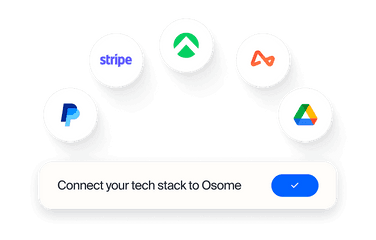
Integrations
Connect Aspire, Airwallex, Wise, Revolut Business, Stripe and Google Drive once.
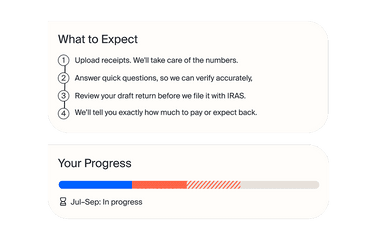
Workflows & support
Comment on any transaction and your accountant replies in the same place.


See what our product team has been shipping

Built fast to help you build faster
We ship new features all the time, from smarter categorisation to self-serve filings. See what just launched.
Built by founders,
loved by founders globally
92 %of customers recommend us
“Osome just made everything easier.”


“Osome and their team makes accounting and getting the correct documents in order for company and bookkeeping easy and reliable.”
Peter Riverwind
FAQ
What is bank reconciliation and how does Osome automate it?
Bank reconciliation proves that every payment in or out of your account matches a real business record, like an invoice or receipt. Osome pulls in your transactions, AI categorises them and pairs them with your documents, and an accountant verifies anything the AI isn't confident about.
Which banks can I connect?
Wise, Revolut Business, Airwallex and Aspire connect directly, as do Stripe and PayPal, and UK and EU banks connect through Open Banking. Banking elsewhere? Drag and drop your statements and Osome detects the bank and files them for you.
Does the AI make the final call?
No. If a model isn't confident, the transaction goes to a human accountant. Anything that needs professional judgement is reviewed by a person.
Does it get smarter over time?
Yes. The AI learns from your accountant's approved corrections, so suggestions for your company sharpen the more you use Osome.
How do I send you receipts?
Five ways: sync a Google Drive folder, forward to your Osome inbox, upload on the Transactions page (one at a time or in bulk), attach from your Osome Files, or snap a photo in the app.
What does Needs attention mean?
Transactions waiting on you, usually a missing document or a question from your accountant. Upload or reply right from the list.
How current are my books?
Connected accounts sync automatically and new documents are processed as they arrive, so your books stay current between month-ends. You don't have to wait for a report to see where you stand.

We’re using cookies! What does it mean?