Business integrations that
keep your books up to date
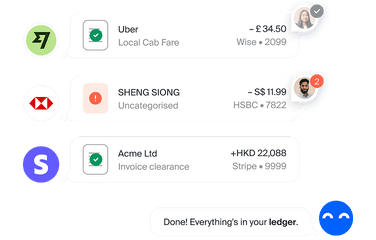
Link your bank, payment apps, Google Drive and even your AI assistant once. From then on, transactions and receipts arrive on their own, and your books keep up.

Connect once. Never export again.
Every integration has one job: get your data into Osome without you lifting a finger.


Connect Wise, Revolut Business, Airwallex or Aspire, or link UK and EU banks through Open Banking. Add Stripe and PayPal, and every transaction lands on your Transactions page.
Automation that stays in your control
Every connection is secure, scoped and yours to switch off.

Need a business account?
Open one with a banking partner like Aspire, right from the app, with your details pre-filled. Once approved, it syncs with Osome automatically.

Forward it and forget it
Your company gets its own Osome inbox address. Forward a bill or receipt and it's read, filed and matched for you.

AI that asks before it acts
Your AI assistant can suggest and apply categories through MCP, but nothing is written to your books without your confirmation.
Connect your AI
in under two minutes
Add the Osome server to your AI assistant, log in, approve, and start asking. Works with Claude, ChatGPT, Gemini, Cursor, VS Code and Windsurf.

Snap it.
Synced.
No scanner needed. Photograph a receipt in the Osome app and it joins the same flow as your Drive and inbox documents.

Part of a greater whole
Books & reconciliation
Synced data becomes reconciled books, checked by accountants.
Insights & reports
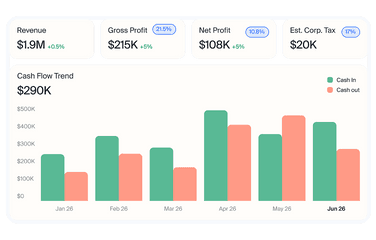
Connected accounts power live revenue, spending and runway.
Cash & payments
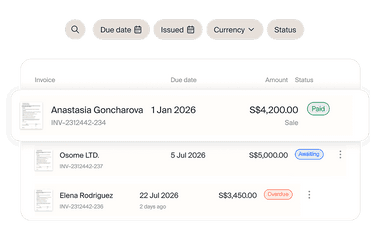
Stripe on your invoices means card payments mark themselves Paid.


See what our product team has been shipping

Built fast to help you build faster
We ship new features all the time, from smarter categorisation to self-serve filings. See what just launched.
Built by founders,
loved by founders globally
92 %of customers recommend us
“Osome just made everything easier.”


“Osome and their team makes accounting and getting the correct documents in order for company and bookkeeping easy and reliable.”
Peter Riverwind
FAQ
Is it safe to connect my bank?
Yes. Bank and Google Drive connections are read-only. Osome can see your data to organise it, but can't move your money or delete your files.
Which business integrations does Osome support?
Banks and payments: Wise, Revolut Business, Airwallex, Aspire, Stripe and PayPal, plus UK and EU banks through Open Banking. Documents: Google Drive and your Osome inbox. AI: assistants that support MCP, including Claude, ChatGPT, Gemini, Cursor and VS Code.
How does the Osome inbox work?
Your company has a unique address ending in @my.osome.com, shown on your Company page. Forward invoices, receipts or statements to it and they're added to your files and matched to transactions.
What files sync from Google Drive?
PDFs, images (JPEG, PNG), Excel and Google Sheets, and CSVs. You choose the folders, and a status dashboard shows when it last synced.
What is the Osome MCP server?
A secure bridge between Osome and your AI assistant. Add the Osome server, log in to approve, then ask questions like "Show me last month's transactions over $ 1,000."
Can my AI assistant change my books?
Only with your say-so. Every write needs your confirmation, and Osome blocks changes to transactions that are already reconciled or have document conflicts.
Does the AI tool store my data?
Osome doesn't store your queries. Access uses OAuth 2.1, is limited to what your account can see, and you can revoke it at any time.
My sales platform isn't connected. What now?
Export your sales report as a CSV and drop it into Files, or sync it from Google Drive. Your accountant takes it from there.
Do I get partner perks?
Yes. Claim deals from partners like Stripe, Aspire, Airwallex and Revolut in the in-app Marketplace, where it's available for your market.

We’re using cookies! What does it mean?